
B2B order automation for Shopify
Turn emailed purchase orders into draft orders.
Bay Order reads the POs your wholesale buyers already email you (PDF, Word, Excel or scans), matches each buyer and product to your Shopify store, and prepares a draft order for you to review and approve. Purchase order automation without changing how your buyers order.
Free to install · AI automation · Email in, draft order out
1Email PO arrives
New purchase order
Inbox · 2 min ago
- From
- Emma Collins · Bluebird Café
- Subject
- Weekly order PO-2291
PO-2291.pdf · 1 page
2AI extracts & matches
PO-2291
Bluebird Café Group
| Product | Qty | Price | Total |
|---|---|---|---|
| House Blend Espresso Beans - 1kg | 24 | $18.50 | $444.00 |
| Barista Oat Milk - 1L × 12 | 10 | $28.80 | $288.00 |
| Double-Wall Cup 12oz - Case of 1000 | 2 | $96.00 | $192.00 |
| Vanilla Syrup - 750ml | 12 | $9.40 | $112.80 |
3Draft order created
Draft order #D1043
Created in Shopify · just now
- Customer
- Bluebird Café Group
- Total
- $1,288.80
- Payment terms
- Net 30
Confirmation emailed to buyer
How it works
From inbox to draft order in four steps
Your buyers keep ordering the way they do today. Bay Order handles the retyping.
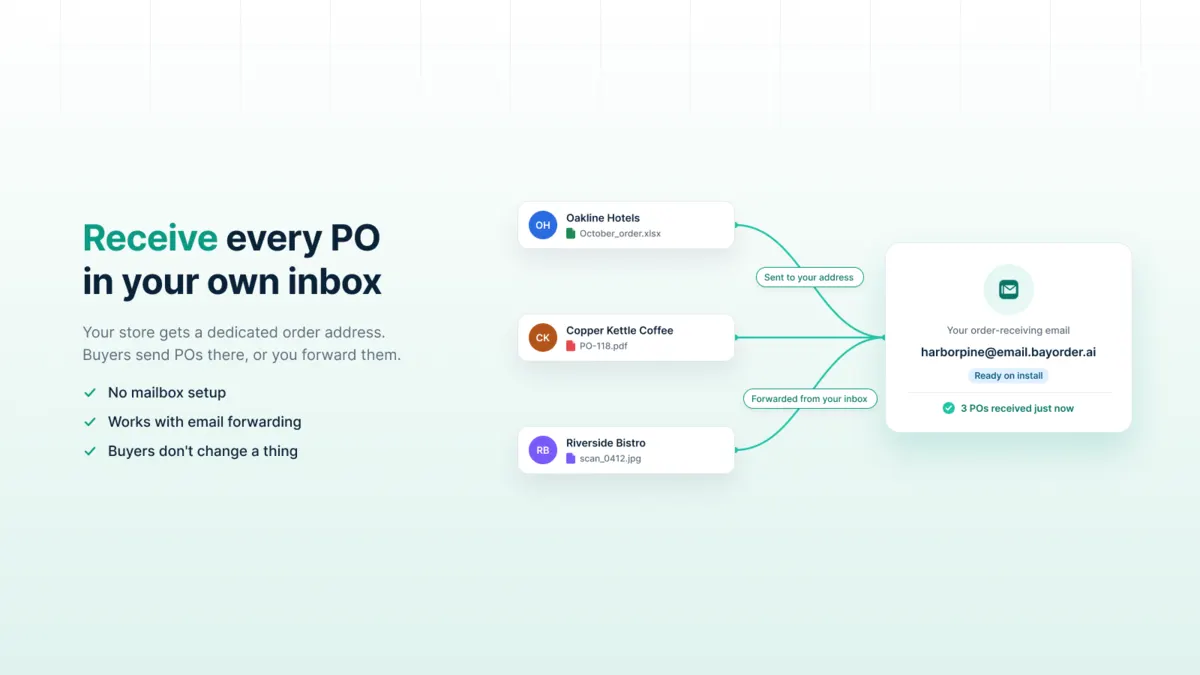
1Receive
Your store gets a dedicated order address. Buyers send POs there, or you forward them from your own inbox.
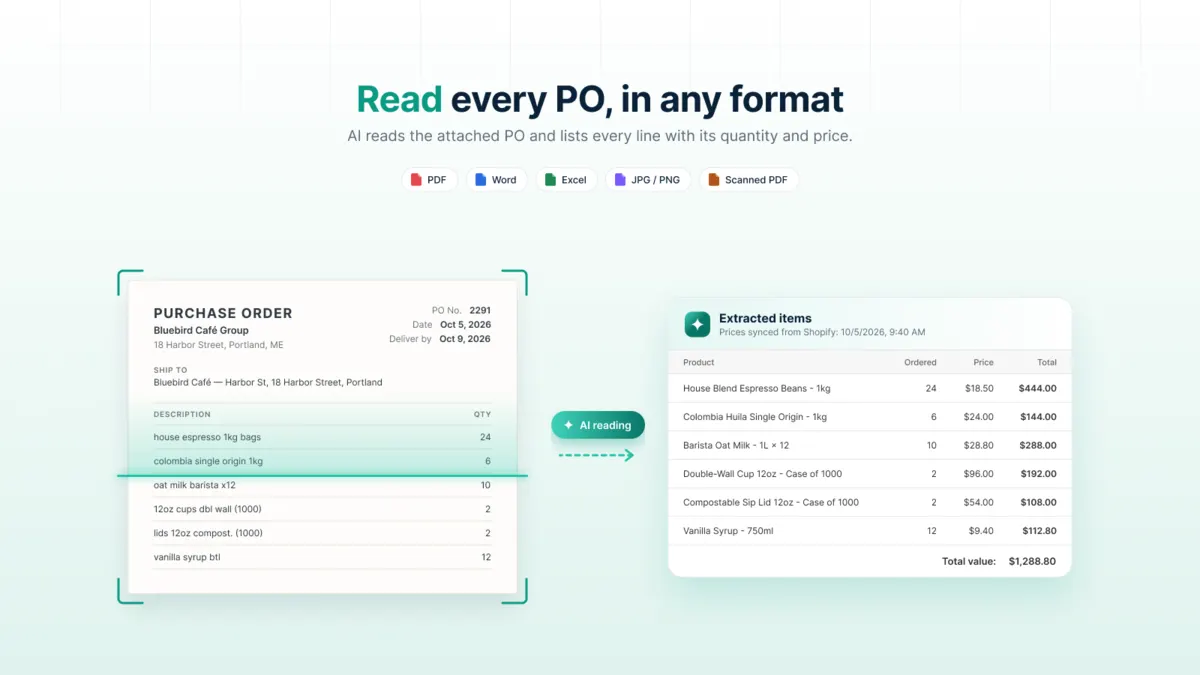
2Read
AI extracts the PO number, buyer, ship-to, requested date and every line item, including from scanned documents.
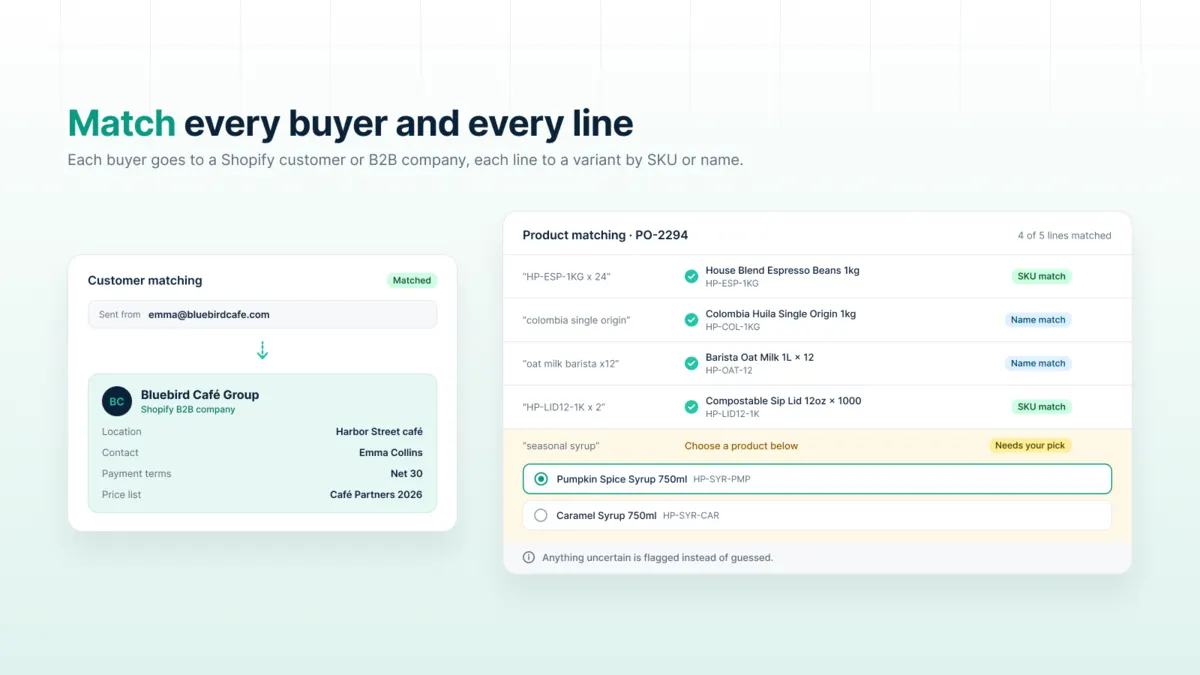
3Match
Each buyer is matched to a Shopify customer or B2B company, and each line to a product variant by SKU or name.
PO-2291 · Bluebird Café Group
4 lines · Net 30 · $1,288.80
4Approve
You review, fix anything that needs it, and approve. Bay Order then creates the draft order in Shopify.
Features
Built for how wholesale orders actually arrive
Dedicated order inbox
Every store gets its own receiving address, ready the moment you install. No mailbox setup.
Reads any PO format
PDF, Word, Excel, images and scanned PDFs. No templates to build and no fixed layout required.
Customer and company matching
Matches buyers to Shopify customers, B2B companies and company locations, so the order lands on the right account.
Product and SKU matching
Lines are matched to your catalog by SKU, then by name. Anything uncertain is flagged instead of guessed.
You approve every order
A review queue shows what was read and matched. Edit, approve or reject. Nothing is created in Shopify without you.
B2B payment terms
Draft orders carry Shopify payment terms such as Net 30 or due on receipt, so invoicing follows your B2B setup.
Inside the app
See your PO processing in one place
Sample views of the PO inbox, the AI extraction review and purchase order reports.
| PO-2291 | Bluebird Café Group | Need review |
|---|---|---|
| PO-8810 | Northside Grocers | Need review |
| PO-2290 | Bluebird Café Group | Confirmed |
| PO-2292 | No customer assigned | Need review |
| Line 1 | House Blend Espresso Beans - 1kg · SKU matched | Matched |
|---|---|---|
| Line 2 | Barista Oat Milk - 1L × 12 · name matched | Matched |
| Line 3 | “Paper cups 12”” · no SKU | Low confidence |
| Ship-to | Bluebird Café, 14 Harbor St | Matched |
| Bluebird Café Group | 12 POs | Last 30 days |
|---|---|---|
| Northside Grocers | 7 POs | Last 30 days |
| Harbor Pantry Co. | 4 POs | Last 30 days |
| Need review | 3 POs | Now |
Security and privacy
Your customers' data, handled with care
Purchase orders contain your buyers' names, addresses and pricing. We treat them that way.
Attachments are virus-scanned before anything reads them. Files that can't be verified are blocked.
Encrypted in transit and at rest. Connections use TLS, and stored credentials are encrypted.
Your data doesn't train AI models. Our AI provider processes documents under commercial terms that don't allow training on them.
A person approves every order, so an extraction mistake never reaches your store unchecked.
GDPR-ready. We honor Shopify's customer data and redaction requests, and delete store data after you uninstall.
What is Bay Order?
Bay Order is a Shopify app that turns the purchase orders your B2B buyers email you into Shopify draft orders. It reads each PO with AI, matches the buyer and products to your store, and waits for your approval before creating anything.
Does Bay Order create orders automatically?
No. It prepares a draft for review. A draft order is created in Shopify only after you approve it, and you stay in control of sending invoices and completing orders.
What file formats can it read?
PDF (including scanned PDFs), Word (.docx), Excel (.xlsx) and common image formats such as JPG and PNG, so a clear photo of a paper PO can work too.
Do my buyers need to change anything?
No. They keep emailing POs in whatever format they use today. Point them to your Bay Order address, or set up forwarding from your existing inbox.
What if a product or customer can't be matched?
The line or buyer is flagged in the review screen so you can pick the right match. Bay Order never guesses silently.
Does it work with Shopify B2B?
Yes. It can match buyers to B2B companies and company locations and apply payment terms. Stores without B2B companies can match regular customers instead.
How much does Bay Order cost?
Bay Order is currently free to install and use. If paid plans are introduced later, they will be billed through your Shopify invoice and you'll approve any charge in Shopify admin first.
Which prices does Bay Order use, the buyer's or mine?
Yours. Every line is priced from your Shopify B2B catalog or a Bay Order price list. The price written in the buyer's PO is shown for reference only and is never charged.
How quickly does a PO show up after a buyer emails it?
Usually within about a minute. It appears under Purchase Orders with the status "Need review".
What happens to emails from addresses Bay Order doesn't recognize?
They're kept in the Ignored emails tab, not deleted. You can recover any of them as a PO and assign the right customer. Bay Order then verifies that address before matching it automatically in future.
Does my buyer get a confirmation?
Yes. When you approve a PO, the buyer receives an email with the order details and a link to confirm it. Once they confirm, the PO is marked Confirmed.
Is there a file size limit?
Each attachment can be up to 10 MB. Files are type-checked and virus-scanned before they're read.
Do I need a separate Bay Order account?
No. You install and sign in with Shopify. There are no extra passwords, two-factor codes or one-time codes.
What happens to my data if I uninstall?
Draft orders and orders already created stay in your Shopify store. Bay Order deletes your store data after you uninstall and honors Shopify's customer data and redaction requests.
Stop retyping purchase orders.
Bay Order is free on the Shopify App Store.